Developers
Add payments to your site in minutes
One script tag. One function call. Cards, bank, and USDC crypto payments, all from a single checkout overlay that works on any website or platform.
How it works
SaturnShift runs as a checkout overlay on your existing site. You keep your design, your flow, your cart.
Load one script tag in your page head
Add a payment button anywhere on your page
Call SaturnShift.checkout() on button click
Customer pays and gets redirected to your confirmation page
What you can integrate
The checkout widget is one piece. SaturnShift also gives you hosted payment pages, invoicing, and a real-time merchant dashboard.
Checkout Widget
Embed a payment button on any page. Opens a secure overlay with no redirect and no custom UI to build.
Payment Links
Generate shareable payment links from your dashboard. No code required. Useful for invoicing, email, or SMS.
Merchant Dashboard
Track every transaction in real time. View payment status, networks used, amounts, and export reports. No backend code needed.
The checkout experience
What your customers see
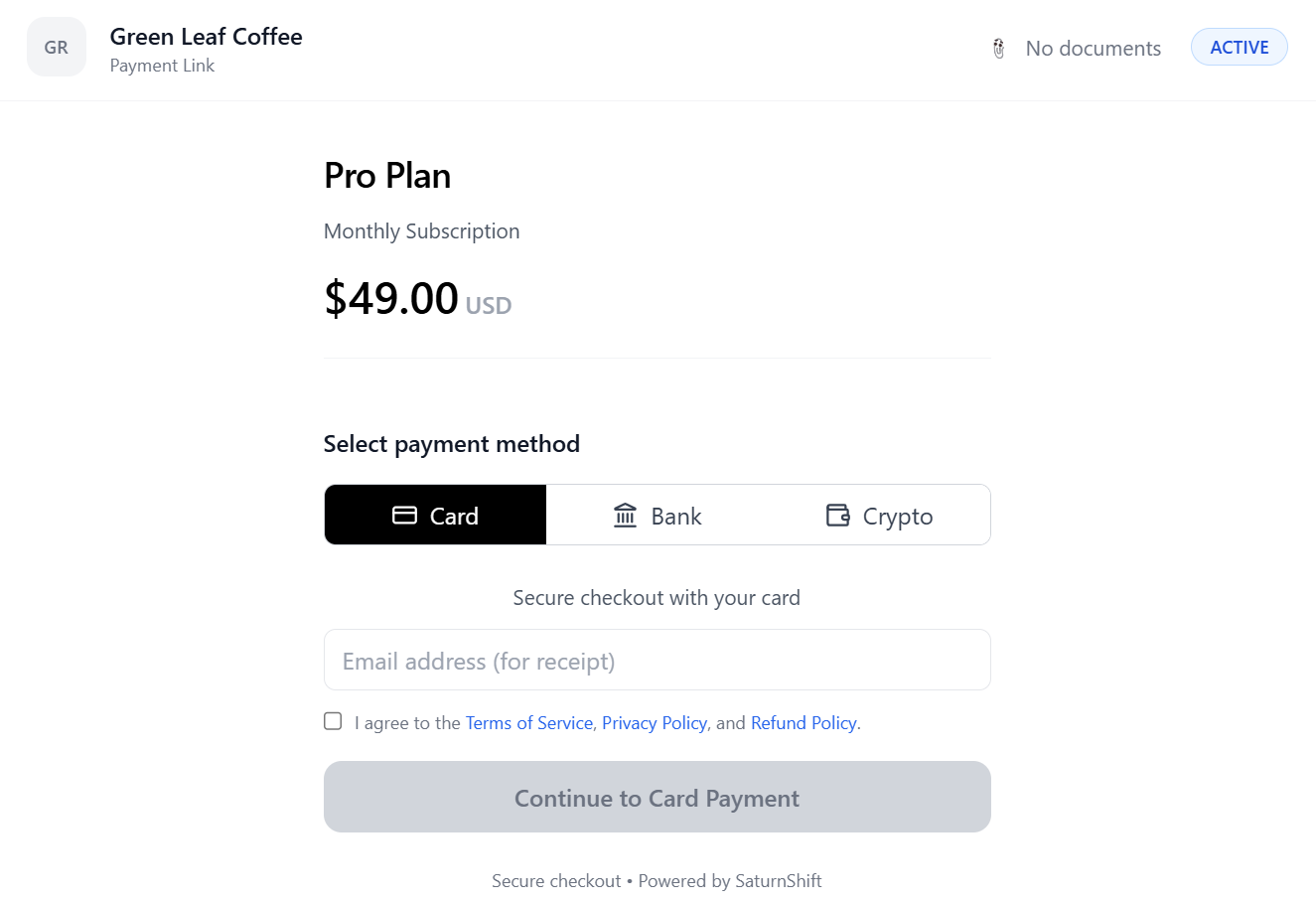
When a customer clicks your payment button, the SaturnShift checkout loads as a secure overlay. No redirects. No new tabs. They stay on your page.
Integration guide
Select your platform.
Step 1. Load the SaturnShift script
Paste this just before the closing </head> tag in your HTML file.
<script src="https://api.saturnshift.io/checkout.js"></script>
Step 2. Add a payment button
Place this where you want the button on your page. You can style it however you like.
<button id="payBtn">Pay Now</button>
This runs alongside your existing checkout. It does not replace it.
Step 3. Initialize the checkout
Paste this inside a script tag at the bottom of your HTML file, just before the closing </body> tag.
// Use your own unique order ID. Keep it stable so a retry of the
// same order dedupes instead of creating a duplicate payment.
const orderId = "REPLACE_WITH_YOUR_ORDER_ID";

SaturnShift.checkout({
  publicKey: "YOUR_PUBLIC_KEY",
  amount: 49.00,
  currency: "USD",
  title: "Pro Plan",
  description: "Monthly subscription",
  externalReference: orderId,
  idempotencyKey: orderId,
  redirectUrl: "https://yoursite.com/thank-you",
  openInNewTab: false,
  allowCard: true,
  allowBank: true,
  allowCrypto: true,
  processingFeeEnabled: false
}, "#payBtn");
Replace YOUR_PUBLIC_KEY with your actual public key from your dashboard. Use a unique value per order for externalReference and idempotencyKey.
Checkout parameters
Full reference for the SaturnShift.checkout() function.
| Parameter | Type | Required | Description |
|---|---|---|---|
publicKey | string | Yes | Your merchant public key from the Developers page in your dashboard. |
amount | number | Yes | The payment amount in USD. |
currency | string | Yes | Currency code. Currently only "USD" is supported. |
title | string | Yes | Product or service name shown to the customer. |
description | string | No | Optional description shown in the checkout overlay. |
externalReference | string | Yes | Your internal order or invoice ID. Used for reconciliation. |
idempotencyKey | string | Yes | Unique key per transaction to prevent duplicate charges. Use your order ID. |
redirectUrl | string | Yes | URL the customer is redirected to after a successful payment. |
openInNewTab | boolean | No | Opens the checkout in a new browser tab instead of an overlay. Default: false. |
allowCard | boolean | No | Enable card payments in the checkout. Default: true. |
allowBank | boolean | No | Enable ACH bank payments in the checkout. Default: false. |
allowCrypto | boolean | No | Enable USDC crypto payments in the checkout. Default: true. |
processingFeeEnabled | boolean | No | Pass the processing fee to the customer at checkout. Overrides the account-level surcharging setting for this transaction. Default: false. |
Crypto supported on
 Ethereum
 Base
Base Polygon
 Arbitrum
Payments settle to your own wallet, in kind, on the network paid.
Frequently asked questions
For payment providers
Building a platform or a PSP?
Offer native crypto payments under your own brand. Our white-label Partner API gives you OAuth2 authentication, REST endpoints, and real-time webhooks.
Ready to start building?
Sign up free and get your API key in minutes. No setup fees, no contracts.